The hub
Schlage® Smart Lock Compatibility Matrix
Model by feature, with the caveat spelled out on every cell that carries one. Cells we have not verified read as an em dash rather than a guess.
Hover or tap any value to read its caveat. . 34 of the cells below are still unverified and show as “—”; they are gaps in our testing, not statements that the feature is missing.
| Wi-Fi built in | Bluetooth | Thread | Apple HomeKit | Apple Home Key | Official Watch app | Siri | Apple Home access codes | Alexa | Google Assistant | Home Assistant | |
|---|---|---|---|---|---|---|---|---|---|---|---|
| ArriveArrive | Yes | — | — | — | — | No | — | — | — | — | — |
| EncodeBE488 / BE489 | Yes | — | No | No | No | Yes | No | No | Yes | Yes | Yes |
| Encode PlusBE499 | Yes | — | Yes | Yes | Yes | No | Yes | Yes | Yes | Yes | Yes |
| SenseBE479 | No | Yes | No | Partial | — | No | Yes | — | Yes | Yes | — |
| Sense LeverFE469 | — | — | — | — | — | No | — | — | — | — | — |
| Sense ProSense Pro | — | — | Yes | — | — | — | — | — | — | — | — |
The one thing most buyers get wrong
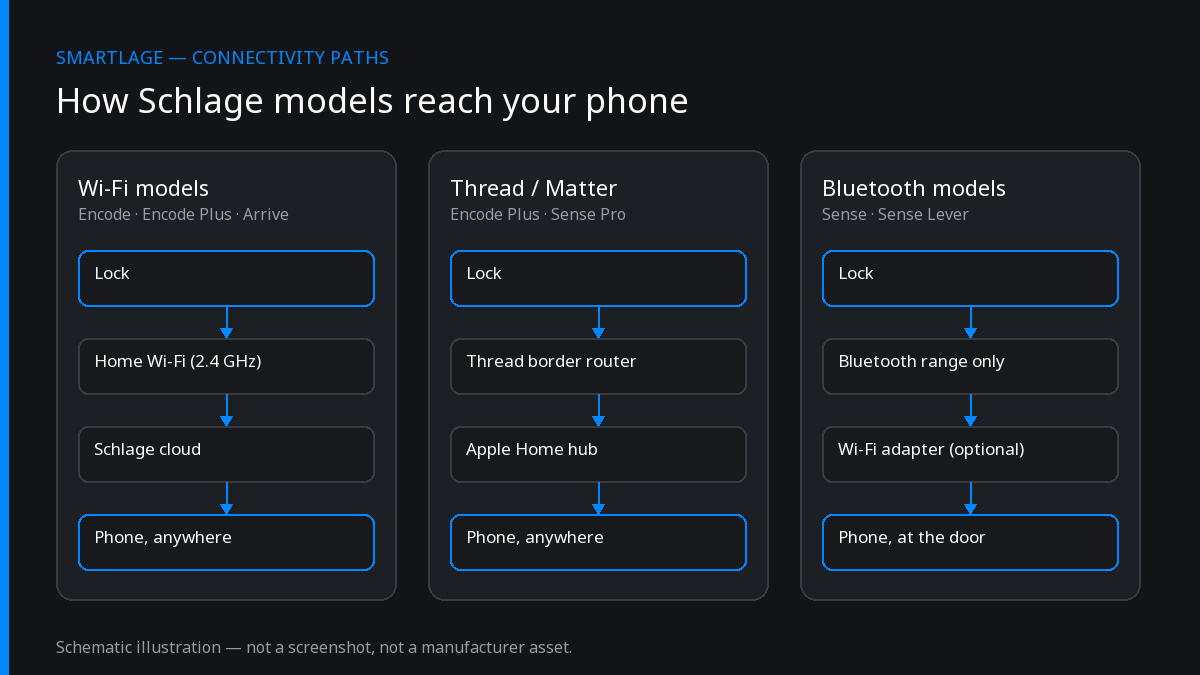
The standard Encode — BE488 deadbolt and BE489 lever — is Wi-Fi only and cannot be added to Apple Home. Not with a hub, not with an adapter, not through the official app. That means no HomeKit, no Home Key, no Siri and no Apple Home automations for the model Schlage sells in the highest volume. People buy it expecting the Encode Plus feature set because the names differ by one word.
If Apple Home matters to you, the Encode Plus (BE499) is the model to buy: Wi-Fi plus Thread, HomeKit, Home Key over NFC, and access-code management from within Apple Home. The Sense (BE479) also supports HomeKit but is Bluetooth-based, so remote access needs the Sense Wi-Fi Adapter.
Connectivity also decides battery life. Thread gives over a year; Wi-Fi gives under three months, because cloud polling is the main drain.
Common questions
- Can the Schlage Encode be added to Apple Home?
- No. The Encode (BE488 deadbolt, BE489 lever) is Wi-Fi only and cannot be added to Apple Home natively. There is no HomeKit, no Home Key, no Siri control and no Apple Home automations for this model.
- Which Schlage lock supports Apple Home Key?
- The Encode Plus (BE499). Home Key uses NFC and requires an iPhone XR or newer, or an Apple Watch Series 4 or newer.
- Does the Schlage Sense work with HomeKit?
- Partially. The Sense (BE479) is Bluetooth-based and supports HomeKit, but remote access requires the Sense Wi-Fi Adapter.
- Which Schlage locks work with the official Apple Watch app?
- The Encode deadbolt and Encode lever only — lock, unlock and status. The Watch app does not support Sense or Encode Plus.
- Which Schlage lock has the best battery life?
- Connectivity decides it. Thread connectivity gives over a year of battery life, while Wi-Fi gives under three months, because cloud polling is the main drain. Of the models here, only the Encode Plus and Sense Pro use Thread.
- Can Home Assistant control a Schlage Wi-Fi lock?
- Yes. Schlage Wi-Fi locks are reachable through Schlage's cloud API using AWS Cognito authentication, and Home Assistant has a native integration built on it that polls lock state every 30 seconds.
Sources
- Manufacturer — Schlage Encode product page (Wi-Fi; “pairs seamlessly with Alexa and Google Assistant”).
- Manufacturer — Schlage Encode Plus product page (Wi-Fi, Thread, Apple Home Key and HomeKit; “pairs seamlessly with Alexa, Siri or Google Assistant”).
- Manufacturer (archived) — Schlage Sense (BE479) product page, Wayback Machine (Bluetooth smart lock; Alexa and Google Assistant compatibility icons; optional Sense Wi-Fi Adapter). The model is discontinued and no longer on schlage.com.
- Manufacturer — Schlage Arrive product page (built-in Wi-Fi). Bluetooth, HomeKit and access-code capacity are not stated there, so those cells stay unverified.
- Integration docs — Home Assistant Schlage integration (cloud-polling integration, 30-second interval).
What we could not verify, and why: Schlage does not publish a Sense Lever (FE469) product page any more and we could not recover an archived copy, so every FE469 cell except the Watch app stays unverified — we are not assuming it mirrors the BE479. Bluetooth is not stated on the current Encode, Encode Plus, Arrive or Sense Pro pages, so those cells stay unverified even though the radio is almost certainly present. Closing the rest needs the per-SKU technical-specification tabs or spec-sheet PDFs.
We also make Smartlage, an independent iPhone app for Schlage® locks — widgets, Shortcuts and faster access codes. What it does.