Schlage® Home App "Failed to Perform Action": How to Fix It
"Failed to perform action" almost always appears while adding, editing or deleting an access code, and it almost always means the app and the lock disagree about the current code list. The fix order that clears it most often: retry over Bluetooth standing at the door, force-quit and reopen the app, delete the code from the lock keypad rather than the app, then remove and re-add the lock to the account. Nothing here requires a factory reset until the last step.
By the Smartlage editorial team ·
Every fix is tested before publication. Steps we could not confirm on hardware are marked [VERIFY] rather than guessed. Our editorial standards.
Tested on: iOS [VERIFY: version not confirmed] · Schlage Home app [VERIFY: version not confirmed] · Lock firmware [VERIFY: version not confirmed] · Hardware [VERIFY: version not confirmed]
This is the most reported error in the Schlage® Home app and one of the longest-running. Owners have posted about it across multiple app versions without an official root-cause statement, so treat any single fix as probabilistic rather than guaranteed.
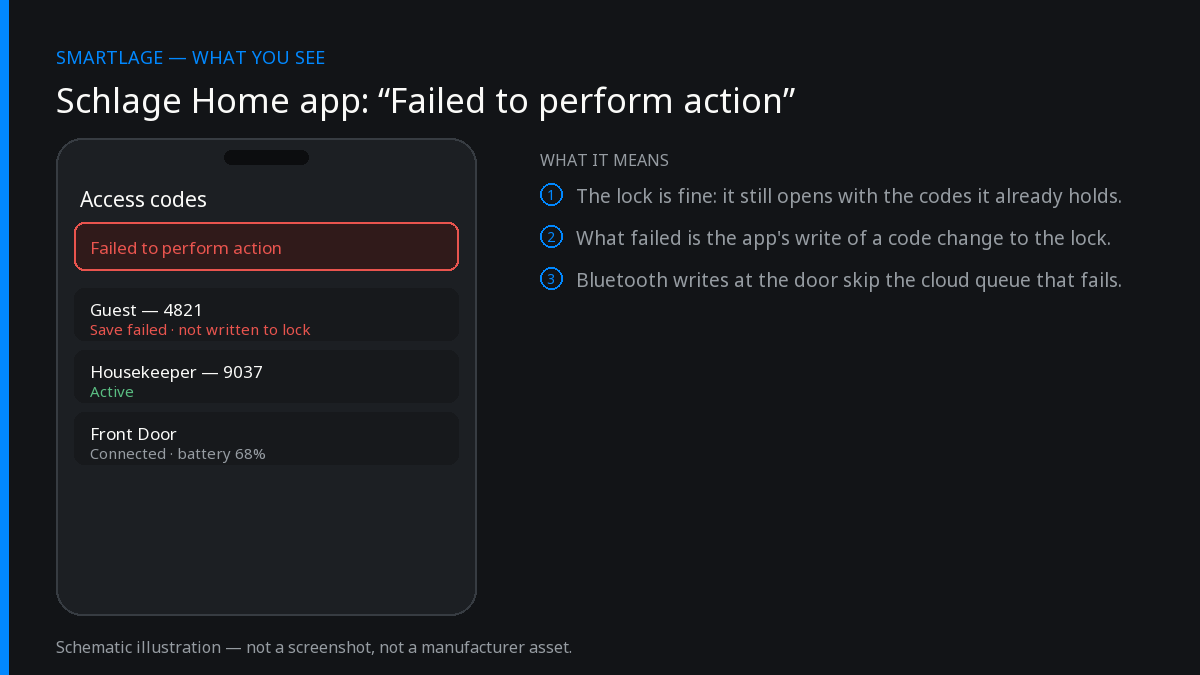
The important thing to understand first: the error is a write failure, not a lock failure. Your lock keeps working at the door with the codes it already has. What failed is the app's attempt to push a change to it. That is why the same message appears whether you were creating a guest code, renaming a user or deleting an expired schedule.
Fixes in the order that clears it most often
Retry the same action while standing next to the lock
Code writes go over the cloud when you are away and over Bluetooth when you are close. Bluetooth writes bypass the cloud queue entirely, which is where most of these failures happen. Stand within a metre of the lock with Bluetooth on and repeat the exact action.
Confirm: The code list refreshes without the red error banner.
Force-quit the app and reopen it before retrying
The app caches the code list from the last successful sync. If that cache is stale, every write is validated against the wrong state and rejected. Swipe the app away from the iOS app switcher, reopen, let the lock finish showing as connected, then retry.
Confirm: The lock shows a current battery percentage and status before you touch anything.
Delete the problem code at the keypad instead of in the app
If the failure is on a delete, remove the code using the lock's own programming sequence, then pull to refresh in the app so it re-reads the list. The app tolerates finding fewer codes than it expected far better than it tolerates a failed delete. [VERIFY: exact keypad programming sequence per model — see the programming guide printed on your lock's manual.]
Confirm: The code disappears from the app list after a refresh.
Check you are not at the code limit
Every model has a maximum number of stored access codes, and an add that would exceed it fails with this generic error rather than a useful one. Delete an unused code and retry. [VERIFY: per-model access code limits.]
Confirm: The add succeeds once a slot is free.
Sign out, delete the app, reinstall, sign back in
This clears the local cache and re-pairs the phone's Bluetooth session with the lock. Your codes live on the lock and in the cloud account, not in the app, so nothing is lost.
Confirm: The lock reappears with the correct code list before you attempt an edit.
Remove the lock from the account and re-add it
The last non-destructive step. Removing and re-adding rebuilds the cloud record that the write is validated against. Expect to re-enter the lock's programming code and to re-create any schedules. Do this only when the earlier steps have all failed, and note down every code first.
Confirm: A new test code adds and deletes cleanly.
Why it keeps coming back
The pattern owners describe is consistent: the error clears for days or weeks, then returns after an app update, a firmware update or a router change. That points at a synchronisation design where the app, the cloud and the lock each hold a copy of the code list, and no single one of them is treated as authoritative.
Practically, that means you should treat the lock itself as the source of truth. When the app and the door disagree, believe the door, and rebuild the app's picture rather than fighting it.
If the error appears on every action rather than only code edits, stop here and check whether the lock is actually reachable — an offline lock produces the same generic message.
What not to do
- Do not factory reset the lock as a first move. It wipes every code and, on HomeKit-capable models, forces a full re-pair including Home Key re-enrollment.
- Do not add the same code twice hoping the second write sticks — duplicate codes are rejected and produce the same error, which reads like the fix failed.
- Do not change your account password mid-troubleshooting. A forced sign-out on other household devices adds a second variable.
The workaround when nothing clears it
Manage codes at the keypad and use the app read-only. Keypad programming does not depend on the cloud, works with a flat internet connection, and is unaffected by the sync bug. It is not elegant, but it is reliable, and for a household with two or three permanent codes it costs you a few minutes once.
For short-term rental hosts who rotate codes weekly this is not viable, and the honest answer is that the official app is currently a weak tool for that job.
Common questions
- Does "Failed to perform action" mean my lock is broken?
- No. It is a write failure between the app and the lock. The lock continues to operate normally at the door with the codes it already holds.
- Will a factory reset fix it permanently?
- It usually clears the immediate error, but owners report it returning later. Because a reset wipes all codes and any HomeKit or Home Key pairing, it is a last resort rather than a fix.
- Why does the code sometimes work at the door even though the app said it failed?
- The write can reach the lock and then fail on the confirmation step back to the app. Always test the code at the keypad before assuming it was not created.
- Is it faster over Bluetooth or Wi-Fi?
- Bluetooth, from right next to the lock. It removes the cloud round trip, which is where most of these failures occur.
- Does deleting the app delete my access codes?
- No. Codes are stored on the lock and in your cloud account. Reinstalling the app re-reads them.
Sources
- Manufacturer: Schlage Home app release notes and in-app error text (observed).
- Owner reports across Apple App Store reviews and community forums, 2025–2026.
Related
- Why the Schlage® Home App Now Shows Ads (And What You Can Do About It)
- Schlage® Home App Notifications Not Working: Complete Fix
- Schlage® Lock Shows Offline in the App But Works Manually
- Schlage Encode (BE489): features, limits and known issues
- Schlage compatibility matrix: every model against every feature
- Schlage Home app alternatives: Apple Home, Home Assistant and third-party apps
We also make Smartlage, an independent iPhone app for Schlage® locks — widgets, Shortcuts and faster access codes. What it does.